
Daily Skills Pick | web-design-guidelines: 130K Weekly Installs — How Vercel Turned a Top Designer’s Intuition into Code Review
Your frontend code runs. It works. It looks decent.
But something always feels slightly off. Dropdowns that lag by a beat. Animations with slightly wrong easing. A weird flash of highlight on mobile taps. Forms that don’t submit on Enter. These issues don’t break functionality. Users can’t pinpoint what’s wrong. But they feel it.
These problems share one trait: people who know consider them obvious. People who don’t never even notice.
Dropdowns should open on mousedown, not click. Interaction animations shouldn’t exceed 200ms. Button press should scale to 0.96, not 0.8. iOS needs its default tap highlight disabled. These details were scattered across design docs, blog posts, and personal experience. No one had ever organized them systematically.
Until Rauno Freiberg did.
Who is Rauno
First, some context.
Rauno Freiberg is Estonian, currently a Staff Design Engineer at Vercel. He previously worked on interaction design for the Arc browser at The Browser Company.
If you’ve used Arc, you remember how buttery smooth the interactions were. That feeling that “every detail has been polished” comes from people like Rauno obsessing over the specifics.
In 2023, he compiled his years of accumulated web interface design knowledge into a document at interfaces.rauno.me. It got 22,000 Stars on GitHub.
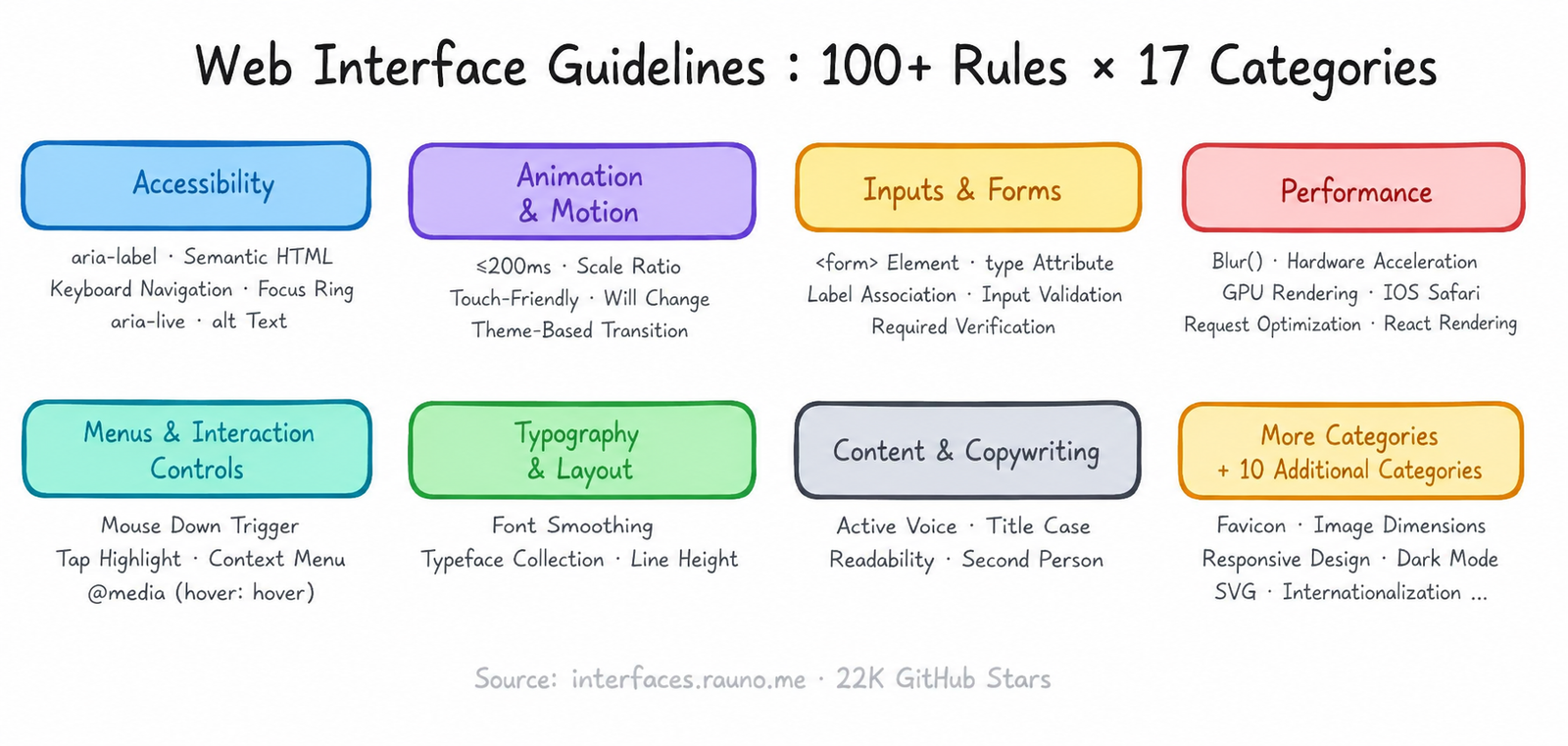
Over 100 rules across 17 categories. From accessibility to animations, typography to performance, input fields to menu interactions. Each rule came from real problems he encountered or best practices he validated in actual projects.
In late 2025, Vercel packaged this document as a Claude Code skill.
It is now the most-installed skill in the entire ecosystem. 130,000 times per week.
What It Does
In one sentence: it takes your frontend code, cross-references it against 100+ design rules, and lists every place that falls short.
How to use it is straightforward:
The output format is file:line — brutally concise. No explanations, no polite hedging. File path, line number, direction. You decide whether to fix it.
The Most Valuable Rules to Know
The full rules number over 100. Here are the ones most developers don’t know but that have the biggest impact:
Perceived Interaction Speed
Dropdown menus should open on mousedown, not click.click The click event only fires after the mouse button is released, adding dozens of milliseconds of latency. Users cannot pinpoint the exact difference, but they can feel whether “this menu is snappy” or “it’s a beat slow”.
Animation Amplitude Should Scale with the Triggering Element
Modal entry scale should go from 0.8 to 1, not 0 to 1. Button press should scale to 0.96, not 0.8. Too large feels exaggerated, too small is imperceptible. These ratios come from testing, not calculation.
Interaction Animations Shouldn’t Exceed 200ms
Past 200ms, people start feeling like they’re “waiting”. It’s not a functional issue,it’s a psychological shift.
iOS Tap Highlight
iOS Safari adds a gray translucent highlight by default on taps. Most people don’t notice it, but once you do, it looks cheap. Use -webkit-tap-highlight-color: rgba(0,0,0,0) to disable it — but remember to add your own tap feedback.
Theme Switching Shouldn’t Trigger Transitions
When many sites switch to dark mode, every element does a color transition. Looks flashy — but it’s a bug. The correct approach is to temporarily disable all transitions during the theme switch.
Use box-shadow for Focus Ring, Not outline
outline doesn’t follow border-radius. A rounded button with an outline focus ring looks square and awkward. box-shadow avoids this entirely.
Add @media (hover: hover) for Hover States
Touch devices have no hover. Without media queries, a hover style can get stuck and never disappear after a user taps a button.
Each rule is simple on its own. But who can remember 100 of them while writing code?
Why Fetch Rules Dynamically
There’s an interesting design decision under the hood.
Most skills have their rules hardcoded in SKILL.md. web-design-guidelines is different — each run fetches the latest rules from GitHub via WebFetch:
This means when Rauno or the community updates the rules, your next review uses them immediately — no skill upgrade needed.
This design has one prerequisite: you need access to GitHub’s raw domain. If your network is restricted, the skill may fail to pull the rules. But for most developers, this isn’t an issue.
How It Compares to Other UI Skills
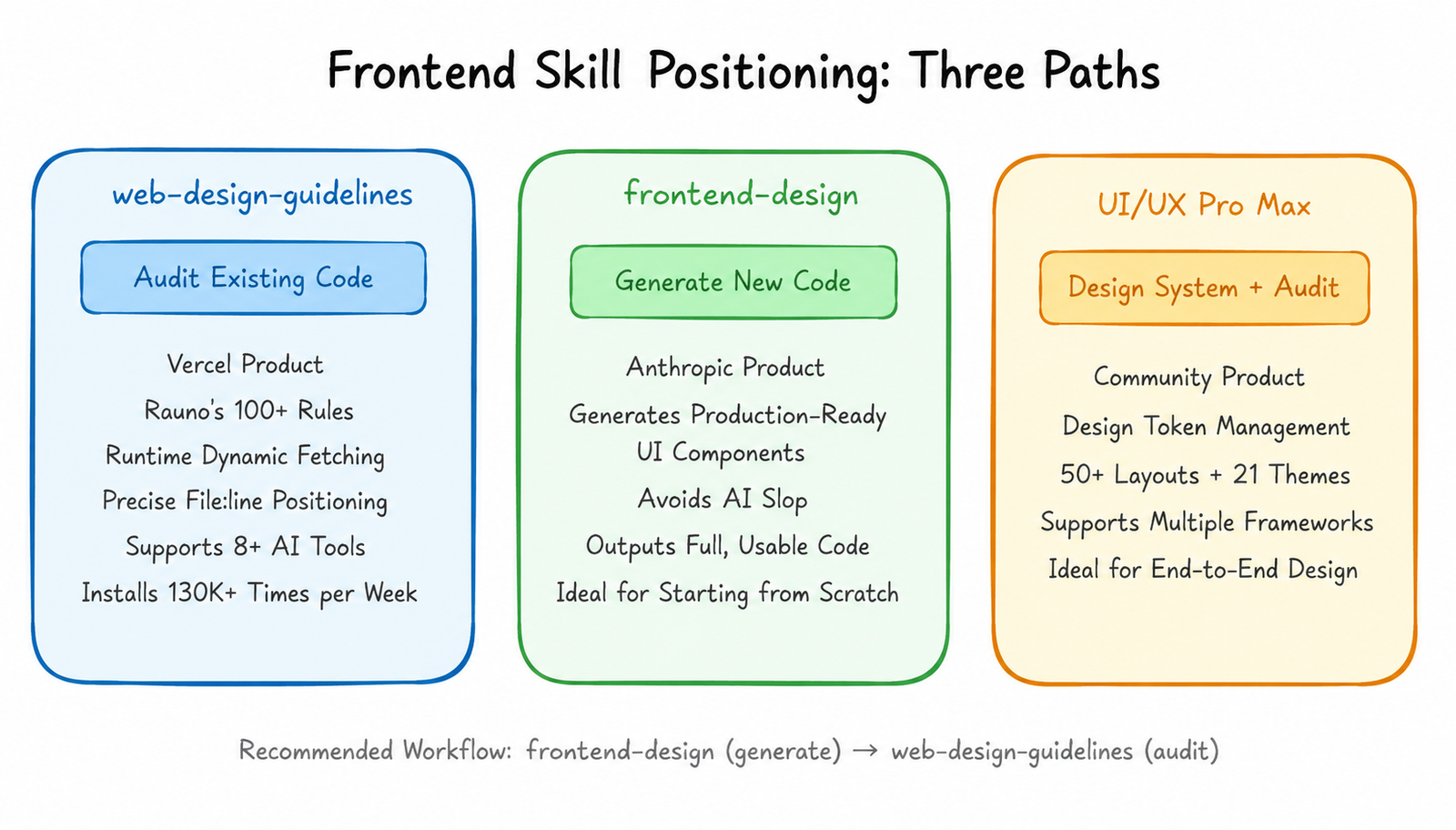
There are several frontend design skills in the ecosystem. Here’s how they differ:
|
|
|
|
|
|---|---|---|---|
|
|
|
|
|
|
|
|
|
|
|
|
|
|
|
|
|
|
|
|
|
|
|
|
|
Put simply: frontend-design helps you write good-looking frontend from scratch, while web-design-guidelines checks your existing frontend for subtle quality issues.
Using both together is most effective. Generate code with frontend-design first, then run it through web-design-guidelines for a review pass.
Why It Became the #1 Installed Skill
130,000 installs per week — and climbing. Here’s why, in my view.
Vercel’s brand carries serious weight. Next.js, Turborepo, v0 — their influence in the frontend space speaks for itself. A design review tool from Vercel earns trust from frontend developers naturally.
The rules themselves are rock solid. This isn’t some blogger’s casual “50 frontend best practices” list — it’s distilled from real projects by the designer behind the Arc browser and Vercel Dashboard. Every rule has a real-world scenario behind it.
Wide install reach. The skill doesn’t just support Claude Code — it works with Cursor, Codex CLI, Gemini CLI, Windsurf, Copilot, and 5 other AI tools. One install command auto-detects your tools and configures everything. This makes its user base far larger than most skills.
Here’s an often-overlooked reason: frontend developers are the largest user group for AI coding tools. The most people are writing frontend — and the most people want help reviewing it after.
Who It’s For
Great for: frontend developers
Whether you use React, Vue, or vanilla HTML/CSS, these rules apply. It checks Web standards, not framework-specific patterns.
Great for: indie devs and small teams
Big companies have design teams to review UI details. Indie devs don’t. This skill essentially gives you a design reviewer who knows the interaction-level nuances.
Great for: anyone wanting more polish in their frontend
If your frontend “works but lacks polish,” it’s very likely missing exactly these kinds of details. Run web-design-guidelines once, fix all the issues it points out, and the quality improves noticeably.
Not ideal for: backend developers
If you don’t write frontend code, this skill won’t help you.
Not ideal for: design teams chasing maximum customization
If your team has its own design system, these rules may conflict with your standards. It provides general best practices, not customized solutions.
My Take
The real reason web-design-guidelines took off: it turned hard-to-transfer knowledge into executable rules.
What does “quality UI” mean?These things used to be learned only by working alongside a good designer over time. Watching Rauno write code, adjust animation parameters, handle focus states — you absorb these details day by day.
Now those details are written as 100+ rules. AI can take those rules and review your code. You don’t have to work with Rauno to get the effect of him reviewing your work.
Of course it’s not exactly the same. What rules can detect is “you’re doing this wrong”; what they can’t detect is “this could be better.” But for most developers, fixing all the “wrong” parts first already makes a huge difference.
130,000 weekly installs — that tells you frontend developers genuinely need someone watching these details. web-design-guidelines does exactly that.
How to install:
Or use Vercel’s one-click install:
Original rules doc: https://interfaces.rauno.me
Daily Skills Pick, coming tomorrow.