
Daily Skill Pick | Multica: Turning Coding Agents Into Real Team Members Is the Next-Gen Team Infrastructure
The more I look at Agent tools lately, the more one thing becomes clear: the real challenge has never been making it run once—it’s making it run consistently, and making sure someone is actually overseeing it.
The best part about single-user tools is that you say one thing and it gets to work immediately. But once you bring them into a team environment, problems start surfacing. Who picks up tasks? Who tracks progress? Who handles blockers? Who preserves the lessons learned from last time’s mistakes? Who decides which runtime a job should go to? Without someone managing these things, an Agent quickly goes from being a “helper” to “noise.”
That’s exactly what Multica is built to handle.
Its positioning is straightforward: an open-source managed agents platform. The latest release is v0.2.27, published on 2026-05-07. It’s not just another chattier CLI—it wants to turn coding Agents into teammates who can genuinely divide labor, collaborate, and accumulate experience.
What Exactly Is It
Think of Multica as a layer of Agent management infrastructure.
In front is a web interface and kanban board; behind it are the backend, database, and local daemon; in the middle, it hooks up runtimes like Claude Code, Codex, GitHub Copilot CLI, OpenClaw, OpenCode, Hermes, Gemini, Pi, Cursor Agent, Kimi, and Kiro CLI. What you see in the interface are issues, agents, and squads—but underneath, the CLIs you already have installed are doing the actual work.
The most human-like thing about it isn’t answering questions—it’s picking up work. You throw an issue at it, and it starts handling it on its own: writing code, reporting blockers, updating status, and leaving comments on the board when needed. This experience is nothing like a single-user tool. A standalone tool is more like an on-demand contractor; Multica feels more like someone who can actually join the project team.
If I had to sum it up in one sentence: Multica doesn’t help you use Agents—it helps you organize Agents.
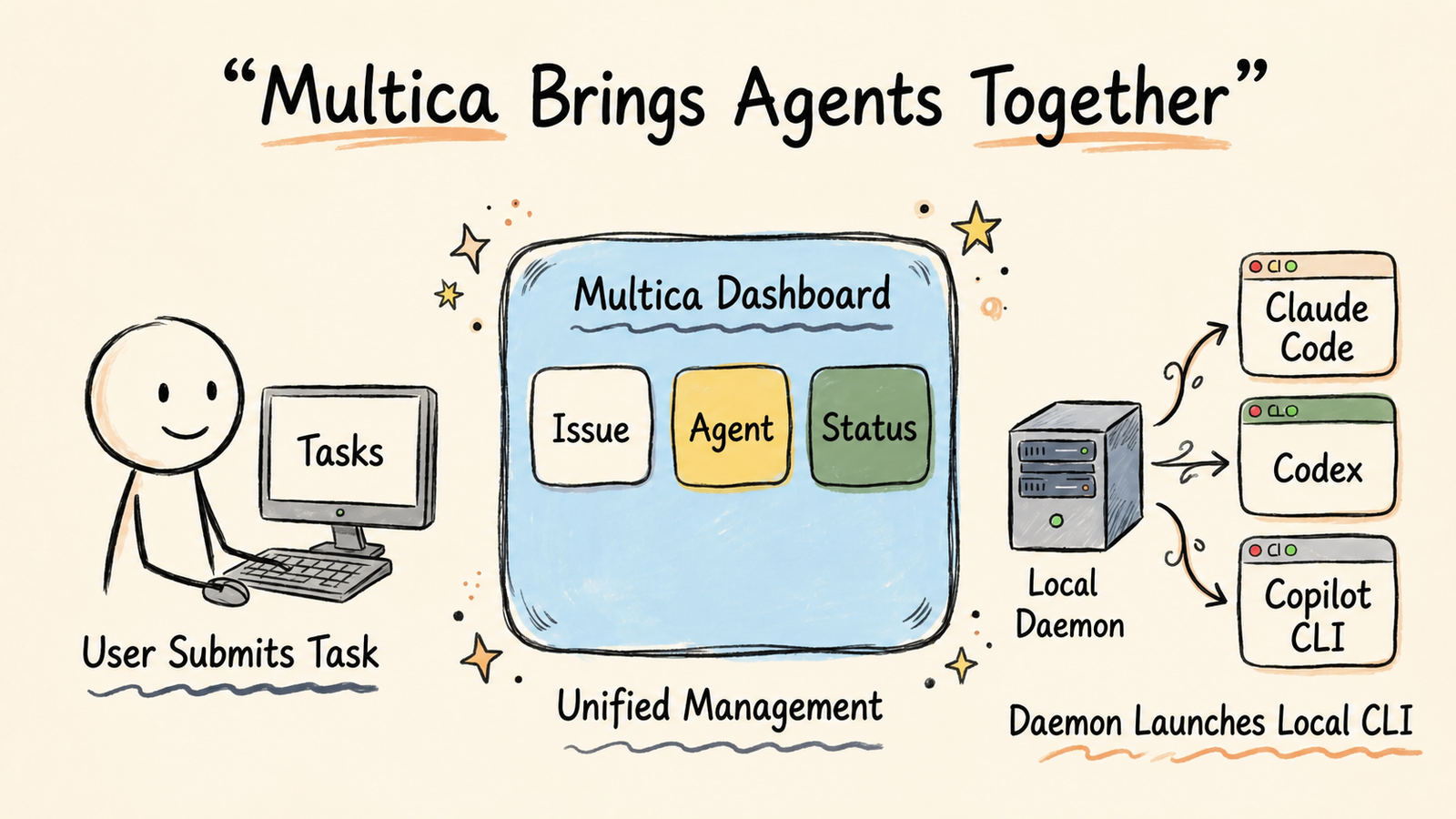
Multica Organizing Agents
Why It’s Interesting
The name Multica naturally evokes Multics. That’s not a coincidence.
In the past, people shared a single machine. Now it’s more like a group of people and a group of Agents sharing one working system. And with that shift, the problems changed too. It used to be “how do we get AI to do the work.” Now it’s “how do we get a bunch of AI and people working together without things falling apart.”
Multica brings back the time-sharing concept, except what gets shared has shifted from machines to autonomous Agents. It cares not just about execution, but about organizational structure. Who handles intake, who does routing, who’s the squad leader, who can see which workspace, whose runtime is available—these are all treated as part of the system, not as afterthoughts.
I think this direction is right. For Agents to truly become part of a team, it won’t be because they talk better—it’s because they behave more like formal members of the system.
From Solo Agent toTeam Agent
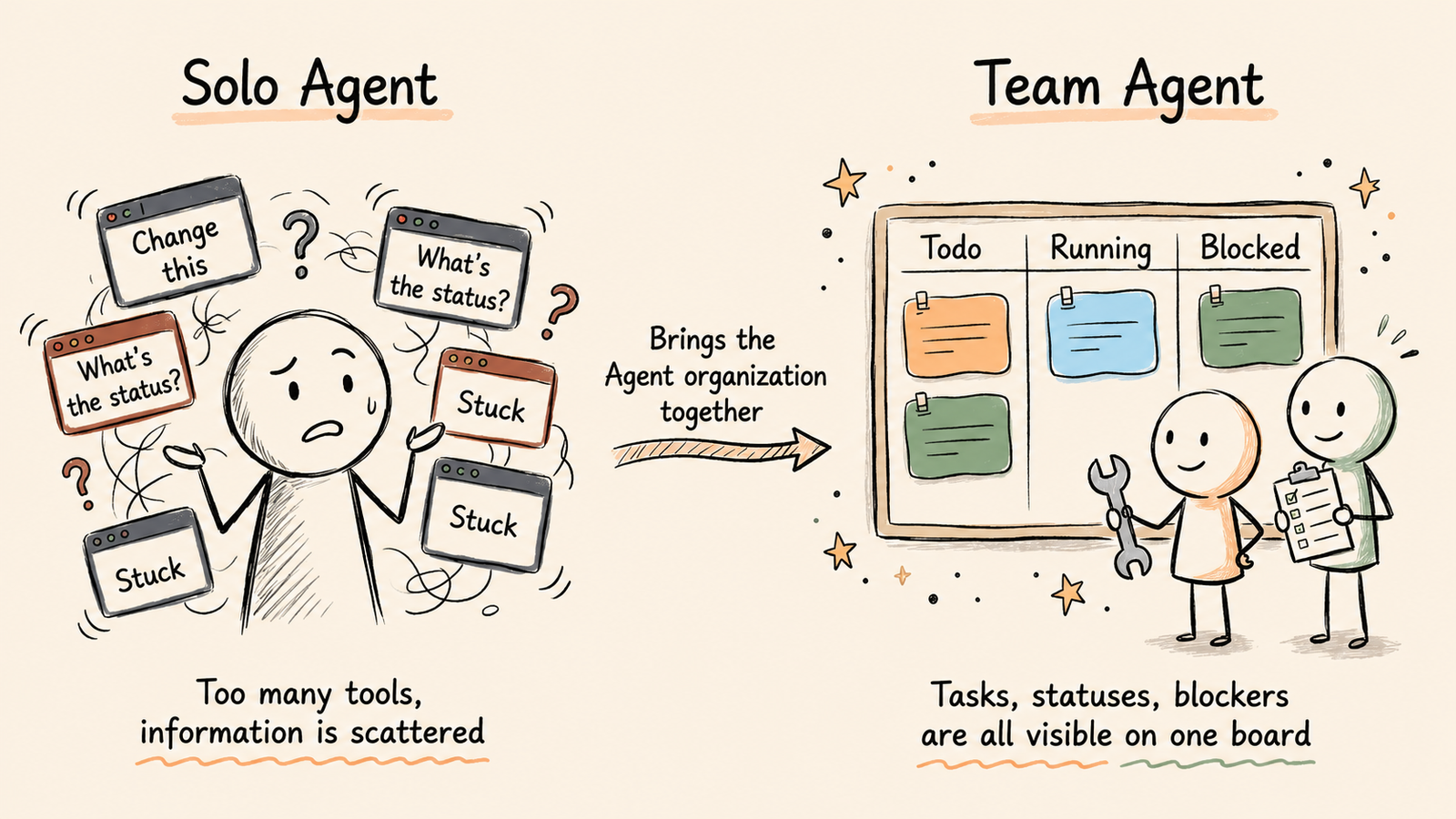
Core Capabilities
After reading through the README, there are really five things worth highlighting.
First, Agents as Teammates. An Agent has its own profile, shows up on the board, posts comments, reports blockers, and gets assigned tasks just like a person. This design is crucial because it forces you not to treat Agents purely as tools.
Second, Squads. You can put humans and Agents in the same squad, then let a leader agent handle task intake and routing. For small teams, this is especially practical—a lot of repetitive decisions can be handed off to the system.
Third, Autonomous Execution. A task doesn’t end when you click a button—it has a full lifecycle: enqueue, claim, start, complete, fail, plus a real-time progress stream. It’s not building a button; it’s building a task pipeline.
Fourth, Reusable Skills. Multica strongly emphasizes turning one-off experiences into reusable assets. Deployment, migration, code review—these things shouldn’t only live in a single conversation round; they should become reusable skills.
Fifth, Unified Runtimes. It manages local daemons and cloud runtimes under a unified view, and automatically detects which CLIs are available on the machine. Bottom line: it doesn’t care how powerful a particular model is—it cares about what this machine can actually do today.
Getting Started
It offers several straightforward ways to get started.
The most common way on macOS and Linux is Homebrew:
After installation, the typical flow is: run setup, check daemon status, create an issue, and assign the task to an agent.
If you want full control over your environment, it also supports self-hosting. The official approach is clear—use --with-server、multica setup self-host, and Docker—you can run the entire stack on your own machine.
This matters. What many teams really care about isn’t whether they can use it—it’s whether this system will eventually force them to hand over control. Multica at least gives you an architectural off-ramp.
A Concrete Scenario
Talking about it in the abstract is still a bit abstract. Let me walk you through a pretty common development scenario.
Say your project has an issue: the Settings page doesn’t refresh after saving an API key. In the past, you’d probably open Claude Code, paste in the error and file path, and ask it to fix it. Multica’s approach feels more like team collaboration:
If, halfway through, it finds that an environment variable is missing or the reproduction steps are incomplete, it doesn’t fail silently—it writes the blocker back to the board.
Taking it a step further, the Squads feature gets even more interesting. You can place different Agents into a group and let a leader agent do the routing.
This isn’t “I open a tool and tell it to write code” anymore.
This is assigning work to a mixed human-Agent squad.
Then there are Skills. For example, every time your team releases, you do the same things: run tests, generate a changelog, check migration scripts, update deployment docs. If you rely on manually writing prompts every time, you’ll eventually miss something.
That’s what I think makes Multica worth writing about. It doesn’t make Agents smarter—it makes the work Agents do feel more like team assets.
Automatic Squad Routing
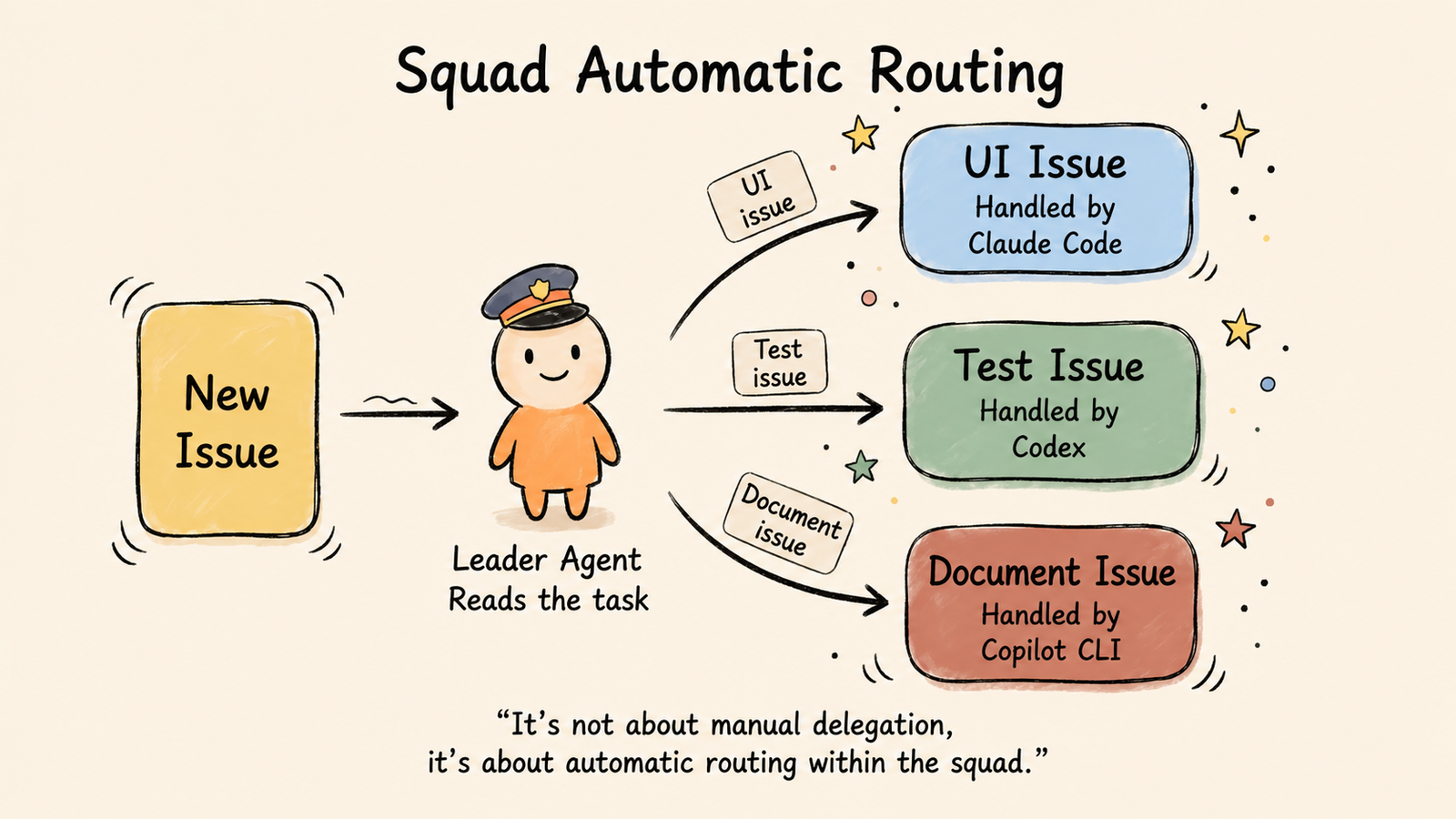
Under the Hood
The architecture is pretty clear: Next.js 16 on the frontend, Go on the backend, PostgreSQL 17 + pgvector for the database, and a local Agent Daemon attached to your machine.
This combination tells you one thing: Multica isn’t just wrapping a frontend shell around it. It’s actually building a platform layer.
The frontend handles the kanban board, collaboration, and configuration. The backend manages the task flow, WebSocket real-time sync, and workspace isolation. The database handles persistence and retrieval. The Daemon is responsible for actually invoking those CLIs locally. This makes the boundary between cloud and local fairly clean.
I like this separation. Because the biggest risk with Agent platforms is that they demo well and fall apart in production. Multica looks like it’s being built with a platform mindset, not a demo mindset.
Who Is It For
If you only use Claude Code occasionally, this might be overkill.
But if you’re already doing these things, it’s a good fit:
• You run multiple Agents simultaneously and lose track of who’s doing what once tasks pile up.
• You want code, comments, blockers, status, and retries all on one board.
• You want Agents running locally or in your own environment, not handing over control to any single platform.
• You want team knowledge to accumulate as skills and runtime rules, not scatter across chat logs.
Put simply, Multica isn’t for people asking “should I use AI to write code?”—it’s for people asking “how do I make AI part of the team?”
My Take
The most important thing about a product like Multica isn’t how many CLIs it supports, or which version it just released.
What makes it truly valuable is turning “Agent collaboration” from a concept into a system. Kanban boards, roles, lifecycles, runtimes, workspaces, skills, squads—all of it.
Once that clicks, a lot changes. You’re no longer just getting AI to produce code—you’re managing a team of humans and Agents. This shift doesn’t sound as flashy, but it’s closer to real production reality.
If we were once just having conversations with Agents, what Multica wants to do is let Agents start entering the organizational structure.
Daily Skill Pick — more tomorrow.